The DTLMod programming interface
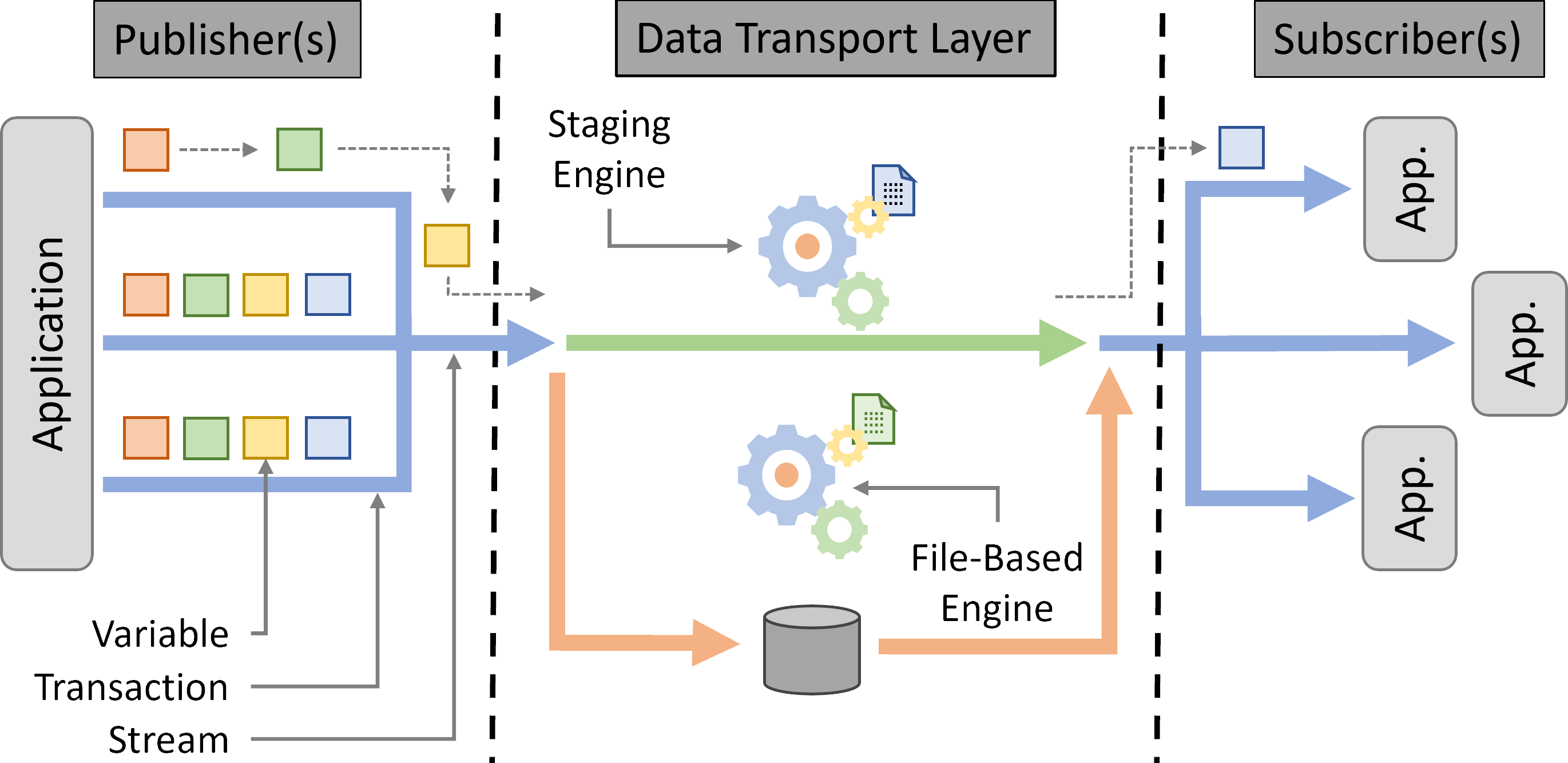
Main Concepts
DTL
A DTL is created by calling DTL::create() at the beginning of the
main() function of your simulator. This function can take as an optional argument a JSON configuration
file that describes the different Streams to be created during the simulation each with a name,
Engine type, Transport method, and optionally a list of reduction methods and a flag to
enable metadata export. A stream entry looks like:
{
  "streams": [
    {
      "name": "my-output",
      "engine": {
        "type": "Staging",
        "transport_method": "Mailbox",
        "simulate_memory_copy": true,
        "open_overhead": 0.33
      },
      "reduction_methods": ["compression"],
      "export_metadata": true
    }
  ]
}
The "engine" object is mandatory. Its "type" is either "File" or "Staging" and its
"transport_method" is either "File", "Mailbox", or "MQ". It also accepts two optional keys:
"simulate_memory_copy" (a boolean, equivalent to calling Stream::set_simulate_memory_copy) to simulate a local memory copy before each put, and "open_overhead"
(a non-negative number of seconds, equivalent to calling Stream::set_open_overhead) to simulate a fixed delay each time an actor opens the stream. Both are
disabled by default.
The "reduction_methods" array accepts any combination of "decimation" and "compression". Each listed
method is pre-registered on the stream (equivalent to calling Stream::define_reduction_method) and can then be applied to individual variables.
The optional "export_metadata" key must be a boolean (equivalent to calling Stream::set_metadata_export when true). Metadata export is disabled when the key is false or
absent, and any non-boolean value is rejected when the configuration file is loaded.
A common in situ processing scenario is that some analyses or visualization are only needed when certain conditions are met. In such cases, a new process is spawned, subscribes to some variables, and analyzes or visualizes data. DTLMod has been designed to enable the development of simulators in which actors can connect to or disconnect from the DTL at any time. A DTL thus remains active from its creation until the end of the simulation when it is automatically destroyed.
Internally, a DTL is implemented as a server daemon process that answers connection and disconnection requests from the simulated actors and maintains the set of active connections.
Stream
The Stream abstraction represents a connection between a simulated actor and the DTL, through which data transport operations occur, and acts as a Variable factory. The publishers define the variables a Stream has to transport. Each publisher provides global and local information about the variable (see Variable abstraction) On the subscribers side, actors first have to inquire about a variable (i.e., to know its shape and size) before being able to retrieve it from the DTL. Actors can also obtain a list of the names of the variables associated to a stream. Finally, opening a Stream creates a specific Engine to actually handle data transport.
Engine
The Engine abstraction is the base interface through which the DTL interacts with the simulated communication or I/O subsystems in charge of the simulation of data movement or storage. DTLMod exposes two types of engines: file-based engines, that write and read data to and from storage and staging engines that stream data from the memory of publishers to that of subscribers.
An Engine is attached to a Stream. A simulated actor can thus adapt the type of Engine to the purpose of each individual Stream. For instance, one can create a stream with a file-based engine to store application checkpoints and another stream with a staging engine to transfer data from one analysis component to another. The type of Engine to use can be specified either at the creation of a Stream or in an external configuration file passed as argument when creating the DTL.
Transport method
An engine is then associated to a specific Transport method that further specifies how data is written to and read from a file system or streamed from one workflow component to another. This separation between Engine and Transport method allows you to switch between multiple implementations of the same service without having to modify the code of your in situ workflow simulator: Changing of transport method simply amounts to modifying a configuration parameter of the Stream.
For file-based engines, the default transport method consists in having each publisher simulate the writing, for each Transaction, of its own share of a Variable in a distinct simulated file located on a specified simulated storage space.
When a subscriber requests a (selection of a) Variable with a different access pattern, DTLMod first computes which files contain the different pieces of the requested variable and then simulates the corresponding read operations of these files, wherever they are virtually stored. The simulation of these I/O operations is delegated to the file system module of SimGrid that exposes high-level abstractions for the simulation of file-system operations on local and remote storage.
To create a file-based Engine, you must specify where to store the simulated files. This is done by
passing as argument to the Stream::open() method a string which contains the
location and name of the targeted file system and a path to a specific directory. This information can also be stored
in a separate configuration file, which means that you can test different scenarios (e.g., using a local or remote file
system) without having to modify the code of their simulator.
The location of the file system has a direct impact on the simulation of I/Os by SimGrid’s file system module. If the DTL accesses a remote file system, a write (resp. read) operation implies the simulation of a network communication before (resp. after) the simulation of the corresponding I/O operation on a storage device.
More details on what happens under the hood when using a File Engine are given in the Inside the File engine section of the documentation.
DTLMod exposes two Transport methods for staging engines. The first method simulates both memory copy and network transfer while ensuring the respect of flow dependencies. Whether a data copy or transfer is simulated depends on the respective mapping of the publisher and subscriber on computing resources. If both run on the same node, they virtually share a memory space, and DTLMod simulates a deep memory copy—as an intra-node communication whose performance can be configured in the description of the simulated platform. Otherwise, it simulates a network communication.
To implement this, DTLMod leverages SimGrid’s mailbox abstraction which acts as a rendez-vous point between actors. Only when two actors meet on such a rendez-vous point, the simulation of a memory copy or data transfer starts.
The second transport method provides you with a “what if an ideal transport existed?” baseline for your performance evaluation studies, e.g., all the data exchanges made through the DTL take zero time. This method leverages another abstraction exposed by SimGrid to simulate inter-process communications: Message queues have the same semantic and purpose as mailboxes, ensuring the respect of control and flow dependencies, but do not induce any simulated time.
Whether to internally rely on mailboxes or message queues to stream data between publishers and subscribers is done by
selecting the Transport method method of the Stream to either Transport::Method::Mailbox or
Transport::Method::MQ. More details on the internals of Staging engines can be found in the
Inside the Staging engine section of the documentation.
Data Reduction
In situ workflows that produce large volumes of data can benefit from data reduction to decrease the amount of data transported through the DTL. DTLMod exposes reduction as an optional operation that can be applied to individual Variable objects within a Stream.
A reduction method is first created on a Stream by specifying its type ("decimation" or
"compression"). It is then applied to a Variable with a set of parameters that control the reduction
behavior—for instance, a stride vector for decimation or a compression ratio and compressor profile for compression.
When a publisher puts a reduced variable into the DTL, the simulation accounts for the computational overhead of the reduction and transports only the reduced volume. On the subscriber side, a decompression cost may be incurred when the data is retrieved. The reduction state of a variable is automatically propagated to subscribers: when a subscriber inquires a variable that has been reduced by its publisher, this information is preserved and prevents conflicting double reductions.
A complete description of the reduction mechanisms, their parameters, and their internal cost models is given in the Data Reduction Operations section.
Variable
At the core of the DTLMod is the data transported from publishers to subscribers. Many in situ processing workflows involve parallel MPI codes as data producers. These codes manipulate multidimensional arrays distributed over multiple ranks. DTLMod adopts this data structure as the basis of its Variable abstraction.
The figure below illustrates how to define a 3-dimensional array, distributed to eight MPI ranks organized in a \(2 \times 2 \times 2\) grid, as a self-descriptive tuple.
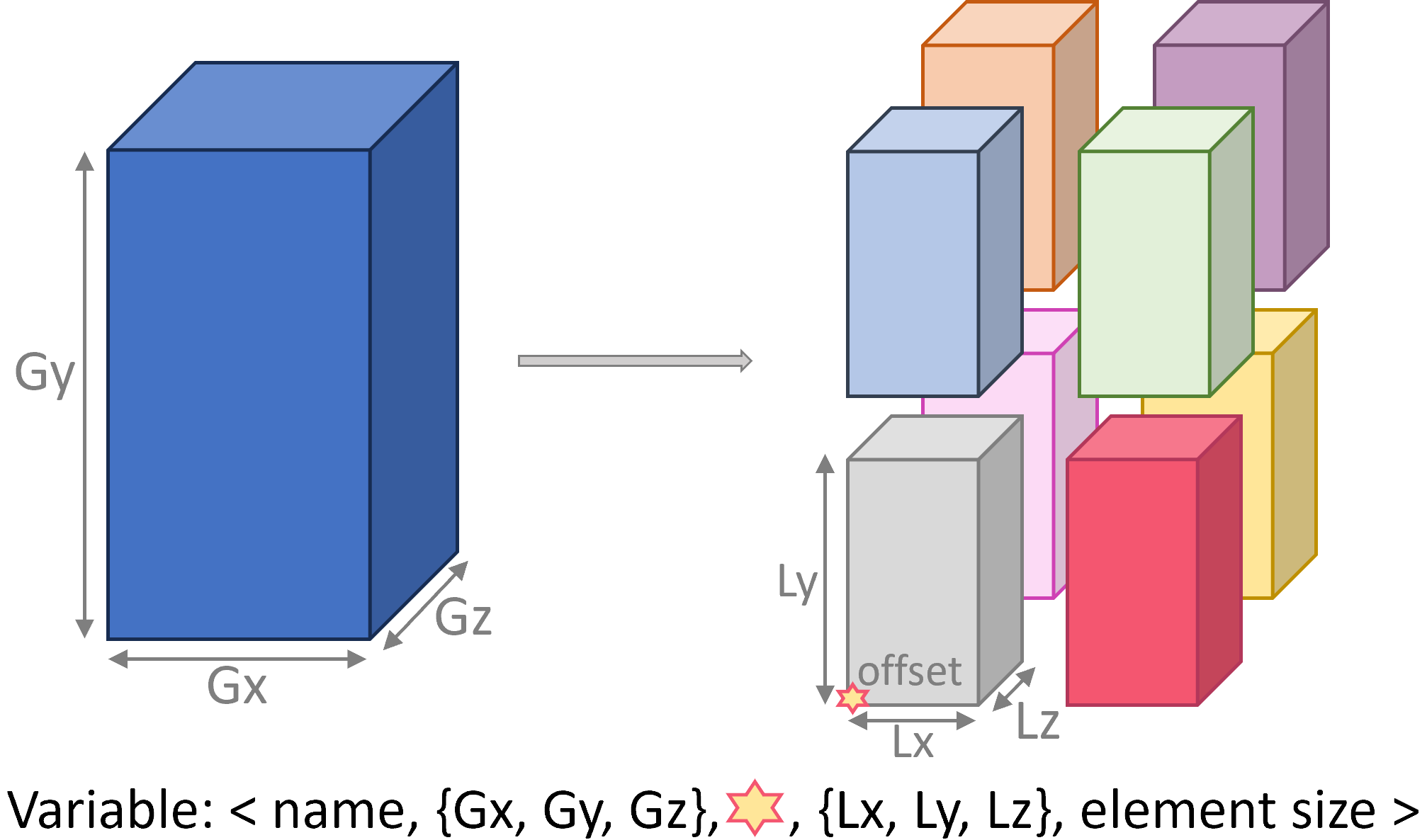
This tuple stores the name of the variable (that is unique to a given Stream), the global dimensions of the multidimensional array (\(G_x\), \(G_y\), and \(G_z\)) and, for each rank, the local part (\(L_x\), \(L_y\), and \(L_z\)) owned by that rank after decomposition and distribution, and a 3D-offset (represented by a star in the figure) that indicates where the local array is positioned in the global array. Finally, the tuple stores the size of the elements in the array.
Transaction
Simulated actors can publish, or subscribe to, one or more Variable variables within a Transaction. This logical construct delimits the interactions between an actor and the DTL and enables the synchronization between publishers and subscribers.
When a simulated actor starts a new Transaction on a Stream, DTLMod makes it wait for the completion of any in-flight data transport activity from the previous transaction on that stream.
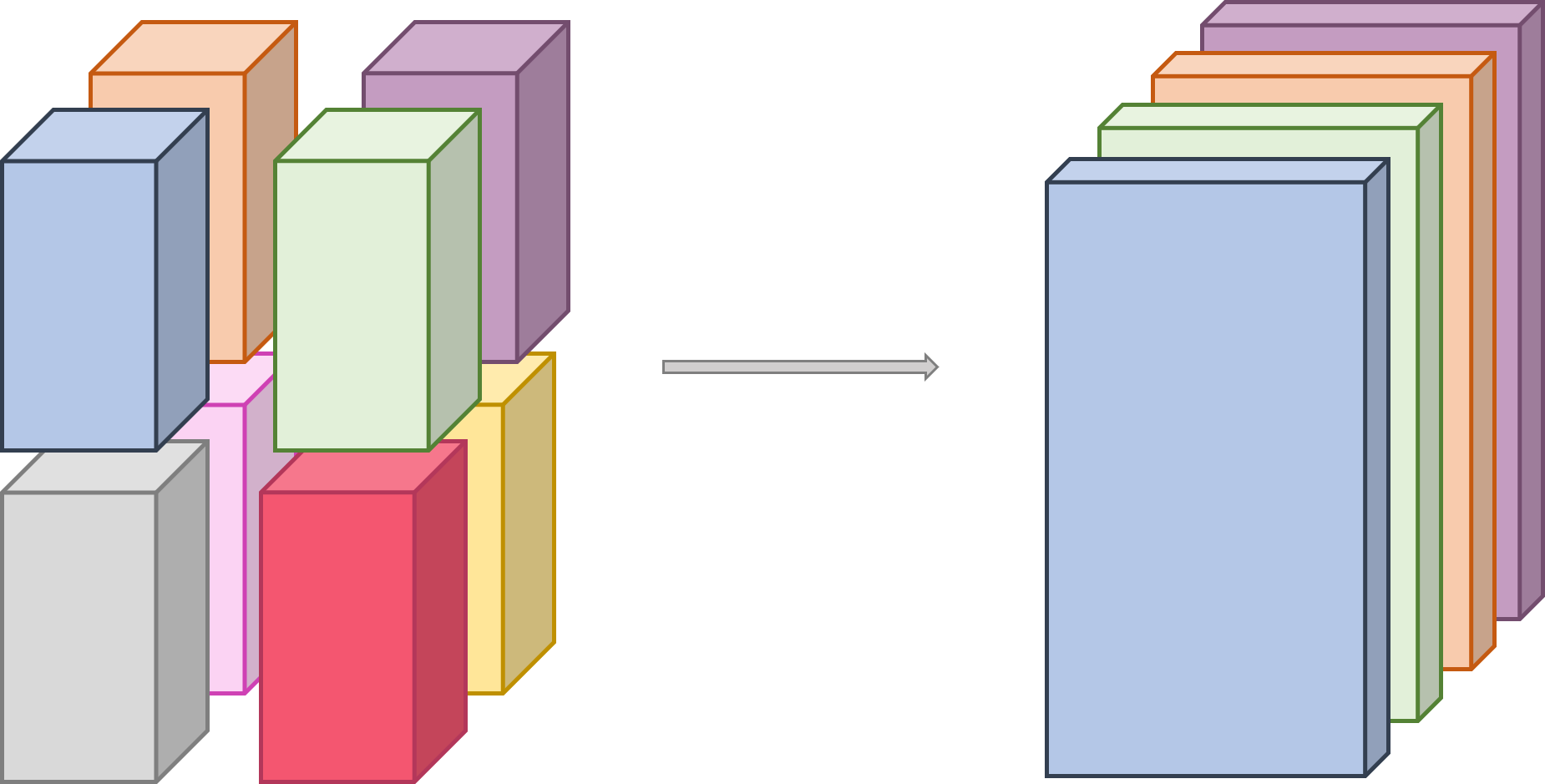
Actors that subscribe to a Variable can also, before beginning a new transaction, select a specific subset of the multidimensional array this Variable represents (e.g., to focus on a smaller region of interest or adapt the decomposition and distribution of the variable to subsequent data processing). The figure below illustrates such a selection, made on the subscriber side. Four actors subscribe to the 3D variable defined the previous section and select blocks of 2D slices, along the Z-dimension.
During its execution, a simulated actor can perform several transactions to model the periodic production of data, its transport, and analysis to monitor the progress of an iterative computation. For any Variable, DTLMod keeps as metadata which actor(s) published it and in which transaction(s). This allows subscriber(s) to select specific transaction(s) when retrieving data from the DTL.
API Reference
class DTL
A class that implements a Data Transport Layer abstraction.
Creation
#include <dtlmod/DTL.hpp>
-
static void dtlmod::DTL::create(std::string_view filename = std::string_view{})
Create the Data Transport Layer.
- Parameters:
filename – a JSON configuration file that provide stream parameters.
import dtlmod
Connection and Disconnection
-
static std::shared_ptr<DTL> dtlmod::DTL::connect()
Connect an Actor to the Data Transport Layer.
- Returns:
A handler on the DTL object.
-
static void dtlmod::DTL::disconnect()
Disconnect an Actor from the Data Transport Layer.
-
inline bool dtlmod::DTL::has_active_connections() const noexcept
Helper function to check whether some simulated actors are currently connected to the DTL.
- Returns:
A boolean value.
Stream factory
-
std::shared_ptr<Stream> dtlmod::DTL::add_stream(std::string_view name, Engine::Type type = Engine::Type::Undefined, Transport::Method method = Transport::Method::Undefined)
Add a data stream to the Data Transport Layer.
See also
Stream::set_engine_type(), Stream::set_transport_method()
Note
The returned Stream can be further configured by calling set_engine_type() and set_transport_method() if the optional parameters are not specified.
- Parameters:
name – The name of the Stream to add to the DTL.
type – The Engine type for the stream. Defaults to Engine::Type::Undefined, which allows the stream to be configured later via set_engine_type().
method – The Transport method for the stream. Defaults to Transport::Method::Undefined, which allows the stream to be configured later via set_transport_method().
- Returns:
A shared pointer to the newly created Stream object.
-
std::optional<std::shared_ptr<Stream>> dtlmod::DTL::get_stream_by_name(std::string_view name) const
Retrieve a data stream from the Data Transport Layer by its name.
- Parameters:
name – The name of the Stream to retrieve.
- Returns:
An optional containing the Stream handler if found, std::nullopt otherwise.
-
inline const std::unordered_map<std::string, std::shared_ptr<Stream>> &dtlmod::DTL::get_all_streams() const noexcept
Retrieve all streams declared in the Data Transport Layer.
- Returns:
a map of handlers on Stream objects with their names as keys.
class Stream
Configuration
-
Stream &dtlmod::Stream::set_engine_type(const Engine::Type &engine_type)
Stream configuration function: set the Engine type to create.
- Parameters:
engine_type – The type of Engine to create when opening the Stream.
- Returns:
The calling Stream (enable method chaining).
-
Stream &dtlmod::Stream::set_transport_method(const Transport::Method &transport_method)
Stream configuration function: set the Transport Method to use.
- Parameters:
transport_method – the Transport methode to use when opening the Stream.
- Returns:
The calling Stream (enable method chaining).
-
Stream &dtlmod::Stream::set_metadata_export() noexcept
Stream configuration function: specify that metadata must be exported.
- Returns:
The calling Stream (enable method chaining).
-
Stream &dtlmod::Stream::unset_metadata_export() noexcept
Stream configuration function: specify that metadata must not be exported.
- Returns:
The calling Stream (enable method chaining).
-
Stream &dtlmod::Stream::set_simulate_memory_copy(bool value) noexcept
Stream configuration function: specify whether Engines opened on this Stream should simulate the cost of a local memory copy (as a loopback network transfer) before a put. Must be called before Stream::open. This copy is not part of the transaction, hence Engine::cancel_transaction() does not interrupt it.
- Parameters:
value – true to simulate the memory copy overhead, false otherwise.
- Returns:
The calling Stream (enable method chaining).
-
Stream &dtlmod::Stream::set_open_overhead(double seconds)
Stream configuration function: specify a fixed delay to simulate each time an actor opens this Stream, whatever its Engine type and access mode, to account for the setup cost (e.g., connection handshake) of the underlying middleware. Must be called before Stream::open.
- Parameters:
seconds – the open overhead in seconds (0, the default, means no overhead).
- Returns:
The calling Stream (enable method chaining).
-
std::shared_ptr<ReductionMethod> dtlmod::Stream::define_reduction_method(const std::string &name)
Define a new reduction method that can be applied to that Stream.
- Parameters:
name – the name of the reduction method
- Returns:
a shared pointer on the newly created ReductionMethod object
Properties
-
inline Engine::Type dtlmod::Stream::get_engine_type() const noexcept
Helper function to get the Engine::Type of the Stream.
- Returns:
The Engine type
-
std::optional<const char*> dtlmod::Stream::get_engine_type_str() const noexcept
Helper function to print out the Engine::Type of the Stream.
- Returns:
An optional containing the C-string if the type is valid, std::nullopt otherwise
-
inline Transport::Method dtlmod::Stream::get_transport_method() const noexcept
Helper function to get the Transport::Method of the Stream.
- Returns:
The Transport method
-
std::optional<const char*> dtlmod::Stream::get_transport_method_str() const noexcept
Helper function to print out the Transport::Method of the Stream.
- Returns:
An optional containing the C-string if the method is valid, std::nullopt otherwise
-
inline const char *dtlmod::Stream::get_access_mode_str() const noexcept
Helper function to print out the access Mode of the Stream.
- Returns:
The corresponding C-string
-
inline bool dtlmod::Stream::does_export_metadata() const noexcept
Helper function to know if the Stream does export metadata or not.
- Returns:
a boolean indicating if the Stream does export metadata or not
-
inline bool dtlmod::Stream::should_simulate_memory_copy() const noexcept
Helper function to know if a local memory copy overhead should be simulated by Engines opened on this Stream before a put.
- Returns:
a boolean indicating if the memory copy overhead must be simulated or not
-
inline double dtlmod::Stream::get_open_overhead() const noexcept
Helper function to know the fixed delay simulated each time an actor opens this Stream.
- Returns:
the open overhead in seconds (0 if no overhead is simulated)
-
inline const std::string &dtlmod::Stream::get_metadata_file_name() const noexcept
Get the name of the file in which the stream stores metadata.
- Returns:
The name of the file.
-
std::optional<std::shared_ptr<ReductionMethod>> dtlmod::Stream::get_reduction_method(std::string_view name) const noexcept
Helper function to know the reduction method of the Stream.
- Returns:
An optional containing the ReductionMehtod if defined, std::nullopt otherwise
Engine factory
-
std::shared_ptr<Engine> dtlmod::Stream::open(std::string_view name, Mode mode)
Open a Stream and create an Engine.
When multiple actors open the same Stream, only the first one to call this function is in charge of creating an Engine object for that Stream. The Engine creation is thus in a critical section. Each actor calling the open() function is considered as a subscriber to the created Engine.
Both Engine::Type and Transport::Method have to be specified before opening a Stream.
If an open overhead was set with set_open_overhead(), the calling actor then sleeps for that duration.
For the FileEngine engine type, name corresponds to a fullpath to where to write data. This fullpath is structured as follows: netzone_name:file_system_name:/path/to/file_name.
- Parameters:
name – name of the Engine created when opening the Stream.
mode – either Stream::Mode::Publish or Stream::Mode::Subscribe.
- Returns:
A shared pointer on the corresponding Engine.
-
inline size_t dtlmod::Stream::get_num_publishers() const
Helper function to obtain the number of actors connected to Stream in Mode::Publish.
- Returns:
The number of publishers for that Stream.
-
inline size_t dtlmod::Stream::get_num_subscribers() const
Helper function to obtain the number of actors connected to Stream in Mode::Subscribe.
- Returns:
The number of subscribers for that Stream.
Variable factory
-
std::shared_ptr<Variable> dtlmod::Stream::define_variable(std::string_view name, size_t element_size)
Define a scalar Variable for this Stream.
This function creates a new scalar Variable and the corresponding entry in the internal directory of the Stream that stores all the known variables. This definition does not refer to the data carried by the Variable but provides information about its shape (here a scalar) and element type.
- Parameters:
name – The name of the new Variable.
element_size – The size of the elements in the Variable.
- Returns:
A shared pointer on the newly created Variable.
-
std::shared_ptr<Variable> dtlmod::Stream::define_variable(std::string_view name, const std::vector<size_t> &shape, const std::vector<size_t> &start, const std::vector<size_t> &count, size_t element_size)
Define a Variable for this Stream.
This function creates a new Variable and the corresponding entry in the internal directory of the Stream that stores all the known variables. This definition does not refer to the data carried by the Variable but provides information about its shape (here a multi-dimensional array) and element type.
- Parameters:
name – The name of the new variable.
shape – A vector that specifies the total number of element in each dimension.
start – A vector that specifies the offset at which the calling Actor start to own data in each dimension.
count – A vector that specifies how many elements the calling Actor owns in each dimension.
element_size – The size of the elements in the Variable.
- Returns:
A shared pointer on the newly created Variable
-
std::shared_ptr<Variable> dtlmod::Stream::inquire_variable(std::string_view name, double timeout = 0) const
Retrieve a Variable information by name.
A subscriber may call this function before the publisher has defined the Variable. The
timeoutparameter controls what happens in that case:0 (default): do not wait, throw an UnknownVariableException right away;
a positive value: wait for at most
timeoutseconds (of simulated time) for a publisher to define the Variable, then throw an UnknownVariableException;a negative value: wait until a publisher defines the Variable, with no time limit. Unlike Engine::begin_transaction(), this wait is not released by the end of stream: if all the publishers close the Stream without defining the Variable, the subscriber blocks forever. Prefer a positive timeout when the publishers may stop early.
Calling this function after the first Engine::begin_transaction() of the subscriber does not require any waiting, as long as publishers define their Variables before starting their first transaction.
- Parameters:
name – The name of desired Variable.
timeout – The maximum time to wait for the Variable to be defined, in seconds (see above).
- Throws:
UnknownVariableException – if the Variable is not defined (in time).
- Returns:
A shared pointer on the Variable object.
-
void dtlmod::Stream::remove_variable(std::string_view name)
Remove a Variable of the list of variables known by the Stream.
- Parameters:
name – The name of the variable to remove.
-
std::vector<std::string> dtlmod::Stream::get_all_variables() const
Retrieve the list of Variables defined on this stream.
- Returns:
the list of Variable names
class Engine
Properties
-
inline const std::string &dtlmod::Engine::get_name() const noexcept
Helper function to print out the name of the Engine.
- Returns:
the corresponding string
-
inline const char *dtlmod::Engine::get_cname() const noexcept
Helper function to print out the name of the Engine.
- Returns:
the corresponding C-string
-
inline unsigned int dtlmod::Engine::get_current_transaction() const noexcept
Get the id of the current transaction (on the Publish side).
- Returns:
The id of the ongoing transaction.
Transactions
-
void dtlmod::Engine::begin_transaction()
Start a transaction on an Engine.
All put and get operations must take place within a transaction (in a sense close to that used for databases). When multiple actors have opened the same Stream and thus subscribed to the same Engine, only one of them has to do the following when a transaction begins, this function is a no-op for the other subscribers:
if no transaction is currently in progress, start one, exit otherwise
if this is the first transaction for that Engine, create a synchronization barrier among all the subscribers.
Otherwise, wait for the completion of the simulated activities started by the previous transaction.
- Throws:
EndOfStreamException – on the subscriber side, if all the publishers have closed the Engine and the requested transaction will thus never be produced. This includes publishers that closed the Engine without ever starting a transaction.
TransactionCanceledException – if the transaction has been canceled with cancel_transaction().
Put a Variable in the DTL using a specific Engine. If the Stream this Engine belongs to was configured with Stream::set_simulate_memory_copy(true), a local memory copy overhead is simulated first.
The actual data transport is delegated to the Transport method associated to the Engine.
Note
The simulated memory copy is not part of the transaction: cancel_transaction() does not interrupt it.
- Parameters:
var – The variable to put in the DTL
Put a Variable in the DTL using a specific Engine. If the Stream this Engine belongs to was configured with Stream::set_simulate_memory_copy(true), a local memory copy overhead is simulated first.
- Parameters:
var – The variable to put in the DTL
simulated_size_in_bytes – The simulated size of the Variable (can be different of actual size)
Get a Variable from the DTL.
The actual data transport is delegated to the Transport method associated to the Engine.
- Parameters:
var – The Variable to get in the DTL (Have to do an Inquire first).
-
void dtlmod::Engine::end_transaction()
End a transaction on an Engine.
This function first synchronizes all the subscribers thanks to the internal barrier. When the last subscriber enters the barrier, all the simulated activities registered for the current transaction are started.
Then it marks the transaction as done.
- Throws:
TransactionCanceledException – if the transaction has been canceled with cancel_transaction(), on the subscriber side, and also on the publisher side with a Staging Engine. The transaction is then aborted for this actor, which can start the next one with begin_transaction().
-
void dtlmod::Engine::cancel_transaction(unsigned int transaction_id)
Cancel all in-flight activities of a specific transaction, unblocking publishers and subscribers.
Note
Must be called from an external actor not participating in the transaction.
Note
With a Staging Engine, publishers start their next transaction (see get_current_transaction()) before the data of the previous one is fully transferred. Canceling the next transaction in the meantime cancels the previous one, still in flight, instead.
Note
A local memory copy simulated before a put (see Stream::set_simulate_memory_copy()) is not interrupted: the publisher only notices the cancellation once this copy is over.
- Parameters:
transaction_id – The id of the transaction to cancel. If both sides have already moved past this transaction, the call is a no-op to avoid accidentally cancelling a subsequent transaction.
-
void dtlmod::Engine::close()
Close the Engine associated to a Stream.
This function is called by all the actors that have opened that Stream. The first subscriber to enter that function waits for the completion of the activities of last transaction on that Engine. Then all the subscribers are synchronized before the Engine is properly closed (and destroyed).
Note
Publishers synchronize when closing the Engine: this call blocks until every publisher has called close(), whether or not they started a transaction. Subscribers do the same once they have started a transaction. Once the last publisher has closed the Engine, subscribers waiting for a transaction that was never produced are released with an EndOfStreamException.
class Variable
Properties
-
inline const std::string &dtlmod::Variable::get_name() const noexcept
Helper function to print out the name of the Variable.
- Returns:
The corresponding string.
-
inline const char *dtlmod::Variable::get_cname() const noexcept
Helper function to print out the name of the Variable.
- Returns:
The corresponding C-string.
-
inline const std::vector<size_t> &dtlmod::Variable::get_shape() const noexcept
Get the shape of the Variable.
- Returns:
A vector of the respective size in each dimension of the Variable.
-
inline size_t dtlmod::Variable::get_element_size() const noexcept
Get the size of the elements stored in the Variable.
- Returns:
The elements’ size.
-
size_t dtlmod::Variable::get_global_size() const
Get the global size of the Variable.
The global size of a Variable corresponds to the product of the number of elements in each dimension of the shape vector by the element size.
- Returns:
The computed size.
-
size_t dtlmod::Variable::get_local_size() const
Get the local size object.
The local size of a Variable corresponds to the product of the number of elements in each dimension of the count vector by the element size. If variable was published to the DTL over multiple transactions, multiply the size by the number of transactions.
- Returns:
The computed size.
Selection
-
void dtlmod::Variable::set_selection(const std::vector<size_t> &start, const std::vector<size_t> &count)
Allow a subscriber to select what subset of a variable it would like to get.
- Parameters:
start – a vector of starting positions in each dimension of the Variable.
count – a vector of number of elements to get in each dimension.
-
inline void dtlmod::Variable::set_transaction_selection(unsigned int transaction_id)
Allow a subscriber to select what transaction it would like to get.
- Parameters:
transaction_id – the id of the transaction to get.
-
void dtlmod::Variable::set_transaction_selection(unsigned int begin, unsigned int count)
Allow a subscriber to select what transactions it would like to get.
- Parameters:
begin – the id at which the range of transactions to get begins.
count – the number of transactions in the range.